For Elden Ring enthusiasts looking to enjoy the popular Seamless Coop mod without losing their hard-earned progress, understanding how to transfer character saves has become an essential skill in 2025. With the game's continued popularity and the mod's growing community, players frequently ask whether they can safely move their characters between vanilla Elden Ring and the Seamless Coop version without risking a ban.
Understanding the Risks of Save Transfers
Let's address the elephant in the room first: can you get banned for transferring saves between vanilla Elden Ring and Seamless Coop? Unfortunately, the short answer is yes, there is a risk. FromSoftware's ban system operates on a weekly schedule, but don't be fooled if nothing happens immediately after transferring your save file.
Many players have reported that bans can occur sporadically, sometimes weeks or even months after using transferred saves online. Just because your friend successfully transferred a character without consequences doesn't guarantee your safety - they might simply be waiting for the ban hammer to fall.
As one veteran player puts it, "The anti-cheat system is like a sleeping giant - it might not notice you immediately, but when it wakes up, it remembers everything you've done."
The Save Transfer Process for Seamless Coop
Despite the risks, many players still want to transfer their characters to enjoy Seamless Coop with friends. If you're determined to proceed, here's how to do it:
-
First, you'll need to locate your save files:
-
For Windows:
C:/Users/(Username)/AppData/Roaming/EldenRing/(SteamID)/ -
For Linux (Steam Deck):
/home/(username)/.local/share/Steam/steamapps/compatdata/2555901231/pfx/drive_c/users/steamuser/AppData/Roaming/EldenRing/(SteamID)/ -
Launch Elden Ring in Seamless Coop mode and create a new character with a different name than your main character.
-
Save the game and exit back to desktop.
-
Use a tool like Elden Save Copy (available on Nexus Mods) to transfer your character data.
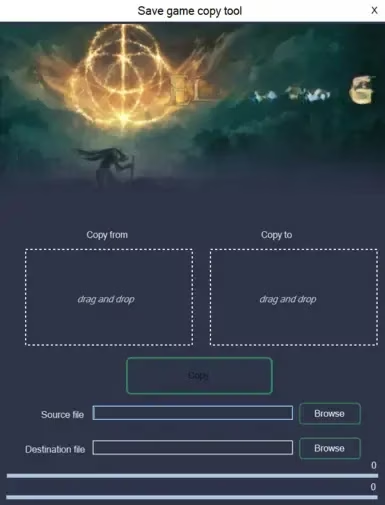
The process involves selecting your source file (vanilla save with .sl2 extension) and destination file (coop save with .co2 extension), then copying the character data from one to the other. The tool makes this process surprisingly straightforward, even for less tech-savvy Tarnished.
Playing It Safe: Offline Mode and Backups
If you're worried about bans but still want to use transferred saves, consider playing exclusively in offline mode. As one player noted, "They are valid in the real game, as long as you don't play online. Beauty of a game that has a singleplayer mode."
Additionally, creating regular backups of your save files is always a good practice, regardless of whether you're using mods or transferring saves. This protects you against potential save corruption, which can be devastating after hundreds of hours of gameplay.
The Community Perspective
The Elden Ring community remains divided on the ethics of save transfers. Some argue that bringing items and levels gained in modded versions back to vanilla is essentially cheating, while others point out that similar advantages can be gained through save backups and item duping, which aren't bannable offenses.
One frustrated player summarized it well: "Nobody cares if others play mods or dupe items in vanilla version. There is no gate to keep."
Final Thoughts: Weigh Your Options
In 2025, with Elden Ring still going strong and its modding community more vibrant than ever, the decision to transfer saves between vanilla and Seamless Coop ultimately comes down to your personal risk tolerance.
If you want the absolute safest experience, maintain separate characters for each version of the game. If you're willing to accept some risk, transfer your saves but stick to offline play in the vanilla version. And if you're feeling particularly bold, transfer away and play online—just don't be surprised if that ban eventually arrives.
The Lands Between are vast and full of dangers, but sometimes the most significant risks come from the decisions we make outside the game itself. Choose wisely, Tarnished.
Comprehensive reviews can be found on OpenCritic, a leading platform for aggregating game scores and critical opinions. OpenCritic's database includes extensive feedback on Elden Ring and its modding community, offering valuable perspectives on how mods like Seamless Coop impact player experience and the broader reception of save transfer practices.